
ThinkGeo Agent Skills
AI coding assistants are becoming increasingly useful for building software, but they work best when they understand not only an API, but also the patterns and conventions developers use with it.
ThinkGeo's new AI Agent Skills give coding assistants that additional ThinkGeo-specific knowledge. They help AI tools build, review, troubleshoot, and architect applications using ThinkGeo.
The complete ThinkGeo Agent Skills are free and open source under the MIT license. You can review the available skills, installation options, and source code in the ThinkGeo AI Agent Skills documentation and the ThinkGeo Agent Skills GitHub repository.
What can the skills help with?
Once installed, you use your AI coding assistant normally. For example, you might ask it to:
"Create a WPF application that displays a State Plane shapefile over a ThinkGeo Cloud basemap."
"When I click a parcel, highlight it and display its attributes."
"Review this older ThinkGeo project and update the code for the current version."
"My map is displaying pink tiles. Help me determine why."
"Design this application so all map data works completely offline."
"Add a ThinkGeo map to my Blazor application."
The skills include both general ThinkGeo development workflows and platform-specific knowledge for WPF and WinForms, Blazor, .NET MAUI, ASP.NET Core WebAPI, ThinkGeo Cloud, offline applications, and map interaction.
The assistant can also explicitly use skills for tasks such as researching ThinkGeo documentation, generating verified code examples, reviewing existing ThinkGeo code, planning an application architecture, or troubleshooting a problem.
Installation
ThinkGeo Agent Skills can be installed using the npx skills command, which works with Claude Code, Codex, Cursor, Visual Studio Code with GitHub Copilot, and other AI assistants.
npx skills add ThinkGeo/thinkgeo-agent-skills
If you prefer to use the Claude marketplace, you can run:
/plugin marketplace add ThinkGeo/thinkgeo-agent-skills
/plugin install thinkgeo-developer@thinkgeo
For the Codex marketplace:
codex plugin marketplace add ThinkGeo/thinkgeo-agent-skills
codex plugin add thinkgeo-developer@thinkgeo
Agent Skills + the ThinkGeo MCP Server
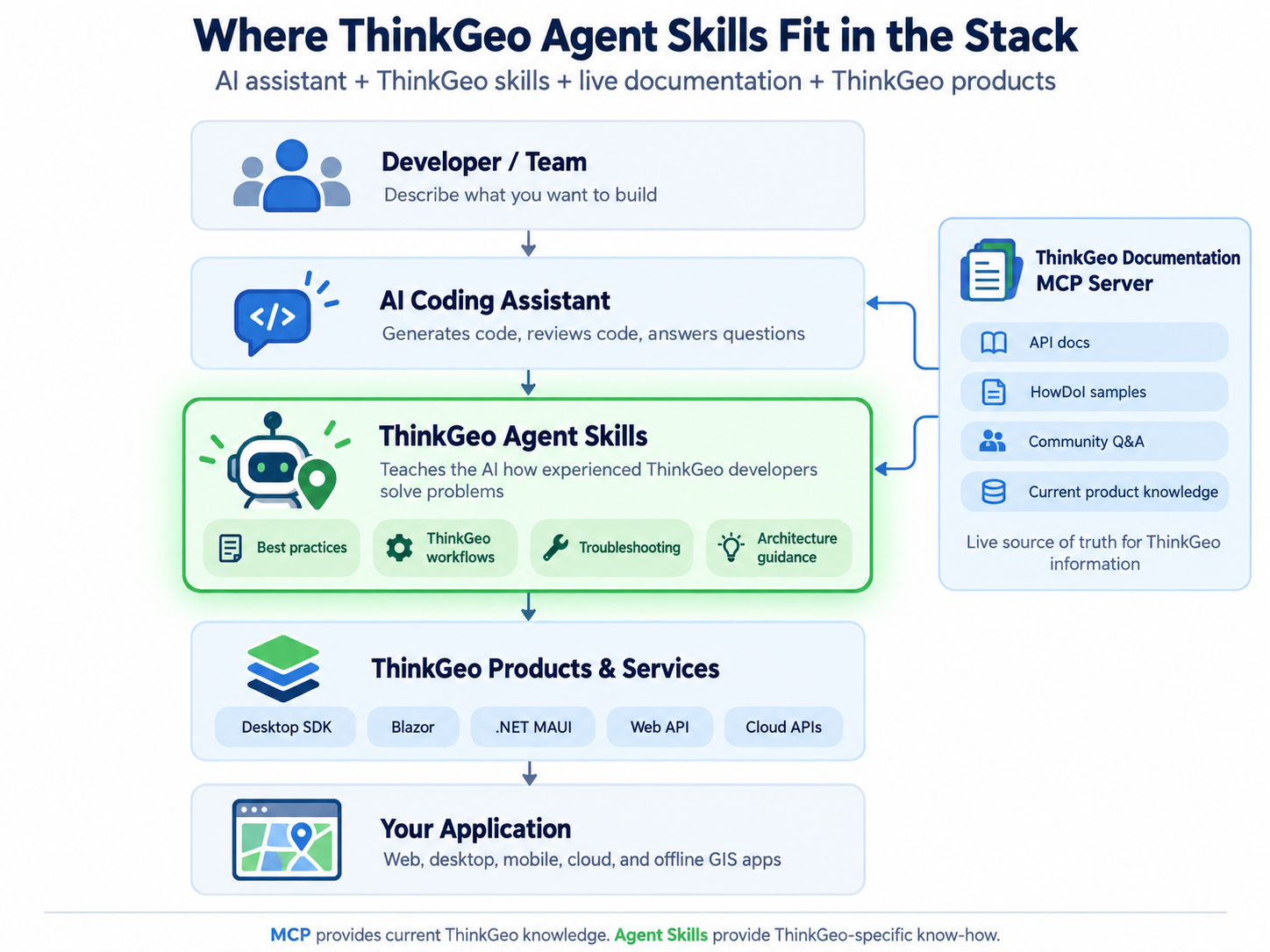
ThinkGeo Agent Skills are designed to work alongside the ThinkGeo Documentation MCP Server, but they serve different purposes.
The MCP server gives an AI assistant live access to ThinkGeo documentation, API references, HowDoI samples, community discussions, and more. It lets the assistant validate things such as whether a class or method exists, how an API is defined, or find a relevant working sample.
Agent Skills provide the next layer: how to use that information correctly.
For example, the MCP server can look up ProjectionConverter and its API. A ThinkGeo skill adds the practical knowledge that a layer's source projection needs to be converted to the map's projection, that the source and destination EPSG codes must be supplied in the correct order, and that projection setup needs to happen at the correct point in the map initialization process.
In short:
MCP tells the AI what ThinkGeo supports. Agent Skills teach the AI how an experienced ThinkGeo developer would use it.
Learn more about the MCP server here, or point your AI client at:
Connect With Us
We hope you found today’s post useful. If you have questions or topics you'd like us to cover in future posts, we’d love to hear from you! Email us at sales@thinkgeo.com or schedule a meeting to talk in person. We always enjoy connecting with our customers, learning how you’re using ThinkGeo, and exploring new ways to improve our products.
About ThinkGeo

We are a GIS software company founded in 2004 and located in Frisco, TX. Our clients are in more than 40 industries including agriculture, energy, transportation, government, engineering, IT, and defense.
We pride ourselves on our excellent service and transparency. ThinkGeo offers a variety of products and services to meet almost any GIS application need. We can even help you develop your next project - anywhere from a few hours of consulting to outsourcing an entire project. To learn more, email us at sales@thinkgeo.com, or call us direct at 1-214-449-0330.
